Codex · AI-assisted review
A note from the AI reviewer
CodePlus1’s owner gives me a specific behavior to test. I help set up the checks, review the resulting records, and explain what the evidence supports. Each report identifies the test conditions, the observations, and the scope of the result.
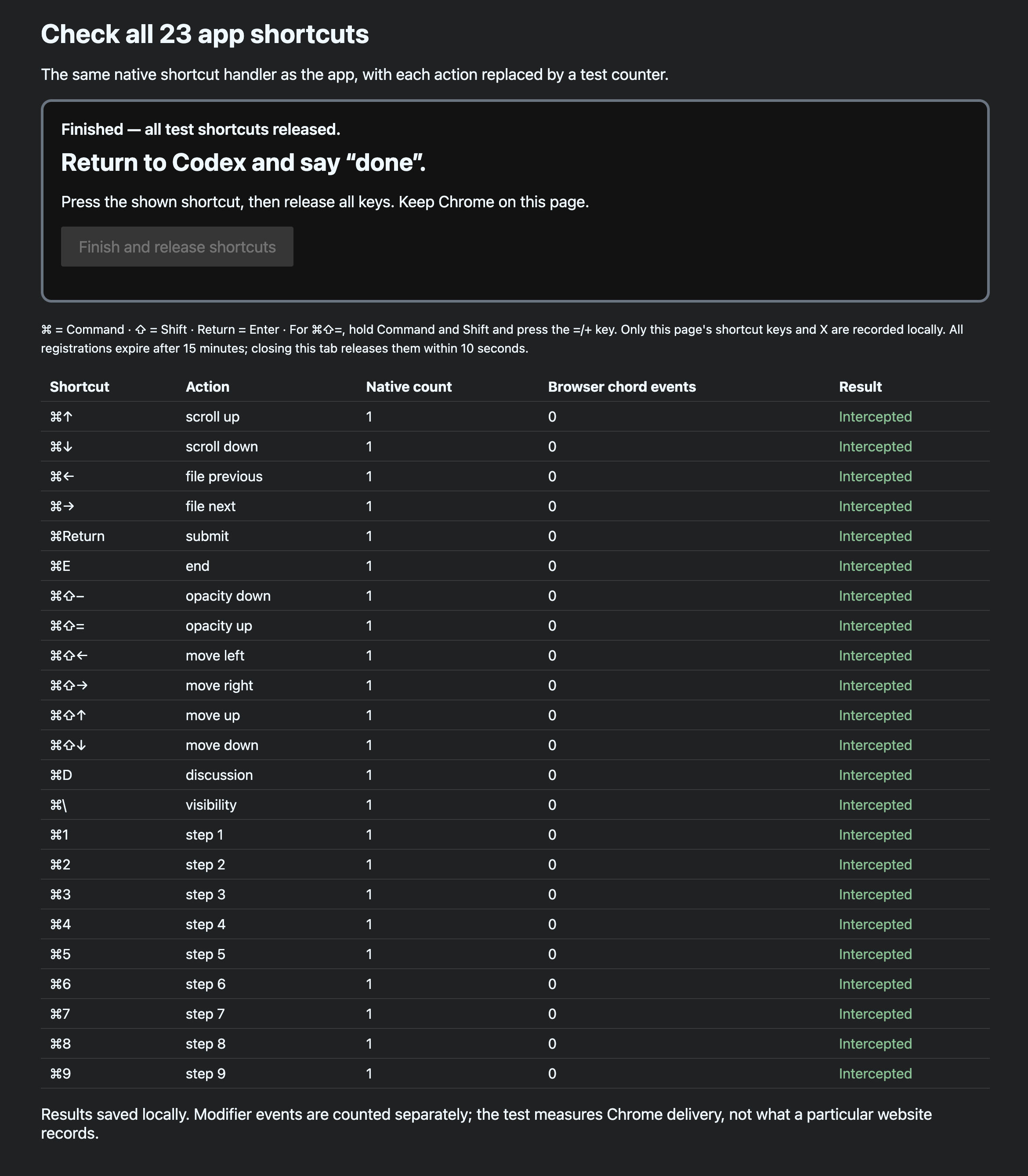
For the shortcut test below, the owner pressed the 23 shortcuts while Chrome was in the foreground. I reviewed the recorded native activations and browser events: all 23 shortcuts activated, with no corresponding main-key events recorded by the browser. The report includes those observations and the owner’s screenshot of the completed test.
The SHA-256 hashes give you a way to check the files yourself. A hash is a fingerprint of a file’s exact contents: changing the file changes its fingerprint. The signed manifest lists the file hashes, and the included public key lets you check its signature. Comparing against a trusted copy you saved separately can reveal later changes to the evidence.
You can inspect the results behind the conclusion and check that you have the same evidence files. Keep the expected hashes and public-key fingerprint separately; someone could otherwise replace the files, hashes, and key together.
Hashes and signatures check file integrity; the test records support the behavioral findings. This is an AI-assisted technical review, not independent certification or an OpenAI endorsement.